
The fastest SD card reader is essential for businesses, professional photographers, and videographers.
With its rapid transfer speeds, professionals can streamline their workflow, eliminating unnecessary waiting times for file transfers.
In this article, you’ll discover the seven fastest SD card readers for Mac and Windows that will accelerate your work process.

7 Fastest SD Card Readers
Here are my 7 top picks:
SanDisk Professional PRO-Reader Multi-Card

- Compatible with CF, SD, and microSD cards
- Premium aluminum enclosure helps keep card cool to maintain fast transfer speeds
- USB-C 5Gbps port enables super-fast data transfer
The SanDisk Professional PRO-Reader Multi-Card is an exceptional choice for professionals looking to streamline their workflow.
Compatible with CF, SD, and microSD cards, this reader features a premium aluminum enclosure that not only maintains the cards’ coolness for fast transfer speeds but also adds a touch of elegance to your workspace.
Its USB-C port supports super-fast data transfers at up to 5Gbps, ensuring efficiency in handling large files.
The write-protect lock switch is a thoughtful addition that prevents accidental data overwriting. For those needing to manage multiple data streams simultaneously, this reader pairs seamlessly with the PRO-DOCK 4 docking station, offering scalable offloads.
It’s a perfect fit for Mac users with USB-C ports, combining functionality with robust build quality.
Verbatim USB C Pocket Card Reader

- Modern compact design offers enhanced portability and functionality
- Integrated USB cable allows fast and convenient image transfer
- Supports memory card formats including Secure Digital SD Secure Digital High Capacity...
The Verbatim USB C Pocket Card Reader is a standout for its compact design, which enhances both portability and functionality. Featuring an integrated USB cable, it offers fast and convenient image transfer, making it a practical choice for photographers and tech enthusiasts alike.
This reader supports a wide range of memory card formats including SD, SDHC, SDXC, Mini SD, Micro-SD, various Memory Stick formats, and MMC—though note that adapters are needed for Mini SD and Micro-SD cards.
Compatible with both USB-C ports and across Mac and Windows platforms, this card reader is a versatile tool for anyone needing reliable data access on the go.
Dockteck 7-in-1 USB C Hub
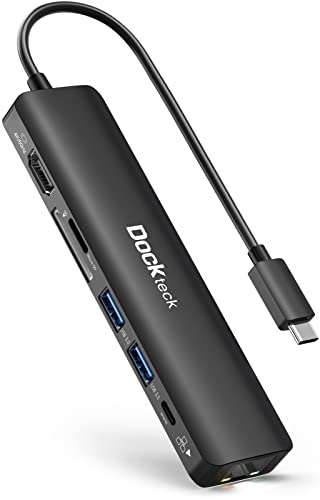
- USB C Dock 7-IN-1: Equipped with 4K @ 60Hz HDMI output, 100W PD charging, 1Gbps RJ...
- Crystal-Clear Visual Enjoyment: Mirror or extend your screens and directly stream...
- Super-Fast Charging & Stable Internet: The 100W PD port offers continuous power...
The Dockteck 7-in-1 USB C Hub is an all-in-one hub that transforms your device into a mini workstation. This dock guarantees a reliable and stable internet connection at up to 1Gbps and ultra-high-speed data transfer at up to 5 Gbps.
The Dockteck 7-in-1 USB C Hub is a versatile and powerful addition to any tech toolkit, transforming a single USB-C port into a mini workstation. This hub includes a 4K @ 60Hz HDMI output for crystal-clear video presentations, 100W PD charging to keep your devices powered up, a 1Gbps Ethernet connection for stable internet, and multiple ports for data transfer including two USB-A ports and SD/TF card readers.
It’s essential to check that your device’s USB-C port supports DP Alt Mode, data transfer, and charging before purchase.
With its ultra-slim design, this hub is not only functional but also highly portable, making it ideal for business professionals, photographers, and anyone in need of a reliable, multi-functional USB-C dock. Plus, it comes with a 24-month warranty and lifetime technical support, ensuring peace of mind and customer satisfaction.
ProGrade Digital Dual-Slot
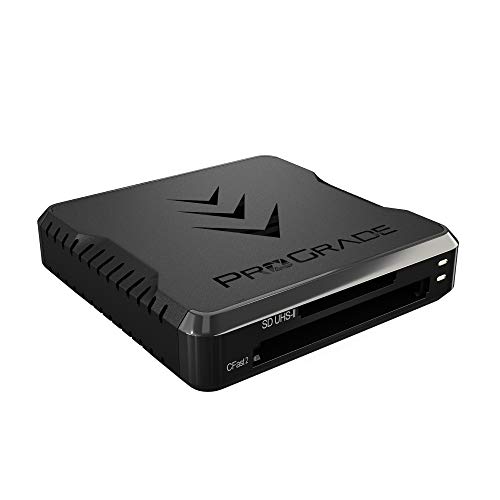
- SPEED: USB 3.1 Gen 2 transfers data at 1250MB/second. Get full-speed transfer of both...
- UNPARALLELED QUALITY: Serialized tracking of key components, firmware and...
- DESIGN: Adhesive magnetic plate (included) attaches to your laptop to create a...
The ProGrade Digital Dual-Slot is designed to elevate your creative workflow. Engineered for speed, it transfers data at an astonishing rate of up to 1.25GB/s from both slots simultaneously, letting you focus more on creating and less on waiting.
This reader is built for life on the go, featuring an adhesive metal plate that attaches to your laptop, transforming any location into a mobile workstation—whether you’re on a mountain top or in the backseat of a car.
With its rugged construction and Refresh Pro capability to maintain optimal performance, the ProGrade Digital reader stands out as a reliable tool for professionals in photography, video, and digital media. It comes with a leading 2-year warranty, ensuring that ProGrade supports you every step of the way.
The SABRENT USB-C 3.0 Hub

- High-Speed Data Transfer: Transfers your data at up to 5Gbps for fast and efficient...
- Easy Installation: Plug & Play, Hot-Swappable design requires no additional drivers...
- Built-in Card Reader: Built in All-in-One Card Reader for flash memory cards provides...
The SABRENT USB-C 3.0 Hub is a compact, plug-and-play device with a built-in card reader for flash memory cards.
It provides data transfer at up to 5Gbps and supports SD/SDHC, Micro SD cards. Its 3 USB 3.0 Type‐A ports make it easy for users to connect multiple devices simultaneously and enjoy the fastest data transfer speeds.
The 6-In-1 Functional USB-C Hub by RayCue
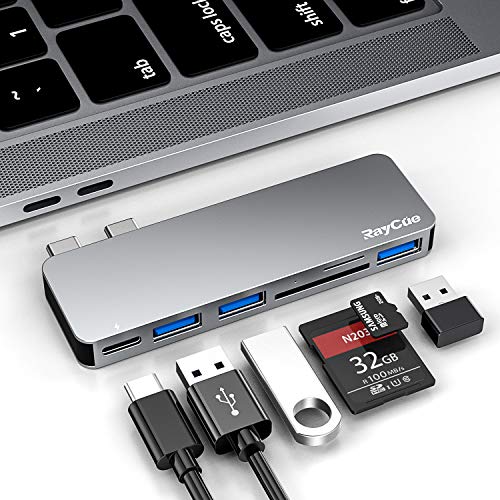
- 6-In-1 Functional USB-C Hub : RayCue MacBook USB adapter hub expand your Mac laptop...
- Effortless Data Transfer : This accessories for MacBook Pro comes with 3 USB...
- 100W Fast Power Delivery : MacBook Pro accessories hub support up to 100W Power...
The 6-In-1 Functional USB-C Hub by RayCue is designed specifically to extend the functionalities of MacBook Pro and MacBook Air. It features a variety of ports, including 3 USB 3.0 ports, a Thunderbolt 3 port, and a universal TF/SD card reader slot. Its unique design avoids any dangles or cables, providing a compact, sleek connection.
The 100W Power Delivery allows for fast charging of both 13” and 15” MacBook Pros at full speed. The Thunderbolt 3 port supports up to 40Gb/s, but the SD/TF card slot itself runs on a separate USB 3.0 connection capped at 5Gbps, so actual card transfer speeds are far lower.
The ZIYUETEK USB C CF Card Reader
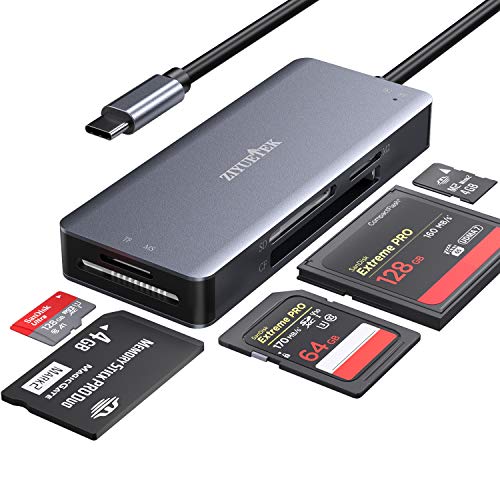
- USB C COMPACT FLASH Card Reader: easily transfer data from a memory card to your USB...
- Read 5 Cards Simultaneously: the compact flash card reader transfers data between SD...
- 5-Port Card Reader Slot: Support SDHC, SDXC, Micro SD, Micro SDHC (UHS-I), Micro SDXC...
The ZIYUETEK USB C CF Card Reader is a versatile reader designed to handle a variety of card formats, including CF, SD/SDHC,TF/Micro SD/MS/M2.
It features a USB Type-C connector that facilitates easy data transfer to your USB Type-C or Thunderbolt 3 Port computer or tablet. The compact flash card reader can read up to 5 cards simultaneously, making it an ideal accessory for high-resolution image and video transfers.
Thanks for reading!
I hope this post clarified you what are the fastest SD card readers 🙂
Sharing is Caring ❤️
If you found this article useful, please share it on social media with your family and friends!
Related Articles:
- GoPro Hero 11 vs GoPro Hero 9: Worth the Upgrade?
- GoPro Hero 11 vs GoPro Hero 10: Worth the Upgrade?
- GoPro Live Stream EASY Guide (Youtube, Facebook, Twitch)
- GoPro Time Lapse Settings [Full GUIDE]
Frequently Asked Questions
Can a cheap reader limit my speed even if I have a fast UHS-II card?
Yes. The reader has to support the same UHS-II bus as the card, or you get bottlenecked down to UHS-I speeds around 104MB/s no matter how fast the card is rated. I always check that a reader explicitly lists UHS-II support, not just a fast USB interface, before buying one.
Is UHS-II actually worth paying extra for?
If you shoot 4K or 6K video or burst RAW photos, yes – a UHS-II reader and card combo cuts import times dramatically compared to UHS-I. For casual shooters moving a few hundred JPEGs, UHS-I is usually fine and you will not notice the difference.
Should I just use my laptop’s built-in SD slot instead of an external reader?
Built-in slots are convenient but many laptops, even recent ones, only wire them for UHS-I. I test the built-in slot with a known UHS-II card before assuming it is fast, and if it caps out, a dedicated external UHS-II reader is worth the small cost.
Does USB-C versus USB-A actually matter for speed?
The connector shape does not determine speed – the USB standard behind it does. A USB-C port running USB 3.2 Gen 1 tops out at the same 5Gbps as a USB-A 3.0 port, so match the reader to your computer’s actual capability and check the Gbps rating, not just the plug.
Why does my reader never hit the speed printed on the box?
Box numbers are usually the theoretical max of the USB interface, not real-world results with your files. An older cable, transferring many small files instead of a few large ones, thermal throttling, and a card that is not really UHS-II all shave off real speed.
Do I need Thunderbolt for fast SD card transfers?
No, Thunderbolt is overkill for SD alone. Even the fastest UHS-II cards top out around 300MB/s, well inside what a standard USB 3.2 Gen 2 (10Gbps) port can handle, so Thunderbolt only pays off if the same hub is also feeding CFexpress cards or external SSDs.

