
Quick Take
DJI Osmo Nano vs Insta360 GO Ultra comes down to whether you edit your footage: if you grade your colors or film with other DJI cameras, the DJI Osmo Nano is still the pick. If you’d rather just film and post, the GO Ultra’s flip screen and microSD recording make it easier. In the US, where the price gap has mostly closed, the Insta360 GO Ultra is an even easier call.
When the DJI Osmo Nano and the Insta360 GO Ultra came out in 2025, I thought the Nano was the easy pick. It shoots 10-bit color, it’s lighter with the screen attached, and in the US it was about $150 cheaper. A year later, its US price has gone up, and it still can’t record to a memory card. That makes the DJI Osmo Nano vs Insta360 GO Ultra choice a much closer call. Here’s how they compare now.

DJI Osmo Nano vs Insta360 GO Ultra at a Glance
Each camera weighs just over 50g, and for a screen and extra battery you snap it into DJI’s Vision Dock or Insta360’s Action Pod.
| DJI Osmo Nano | Insta360 GO Ultra | |
|---|---|---|
| Weight with screen part | 124g | 161g |
| Sensor and top video | 1/1.3-inch, 4K at 60fps | 1/1.28-inch, 4K at 60fps |
| Screen | 1.96-inch, fixed | 2.5-inch, flips up |
| Horizon | Corrects up to about 30° | Full 360° Horizon Lock |
| Color profile | 10-bit D-Log M | I-Log (added later, not at 48fps+) |
| Records to | Built-in 64GB or 128GB only | microSD card (not included) |
| Waterproof | 10m (dock splash-proof only) | 10m (pod splash-proof only) |
| Fast charge to 80% | About 20 min | About 12 min |
Screen, Size and Mounting
The GO Ultra’s 2.5-inch flip-up screen is the more natural way to vlog. The Nano’s screen is smaller and fixed, so for a selfie you snap the camera onto the dock facing the other way. The upside is a lighter setup. Coming from a GO 3 or GO 3S? Your old GO accessories won’t fit the GO Ultra’s new magnetic mount.
The GO Ultra also has full horizon lock, while the Nano only corrects up to about 30°. That’s usually fine for walking, but on a bike, full lock is the safer bet. And DJI mics are no reason to pick the Nano: the GO Ultra pairs with the DJI Mic Mini and Mic 2 over Bluetooth.
Image Quality and Color
In daylight, most reviewers found these two very close. The GO Ultra looks brighter and punchier straight out of the camera, and in low light it tends to come out a little cleaner. The Nano looks more natural, and a bit flatter.
The Nano’s big advantage is color grading. 10-bit D-Log M gives you much more room to change the colors later, and it matches footage from a DJI Pocket or Action camera. The GO Ultra has since gained I-Log, but not at the higher frame rates, so if grading is your thing, I’d still go Nano.
If you post straight to Instagram or TikTok, ignore all of this. The GO Ultra’s normal colors look good on a phone, and Insta360’s app is easier for quick edits than DJI’s Mimo.
Storage: The One You Can’t Change Later
This is the one I’d think about most before buying. The Nano only records to its built-in 64GB or 128GB, and the dock’s microSD slot is only for moving clips off, as my DJI Osmo Nano SD card guide explains. At top 4K quality, that’s roughly two hours on the 128GB and one on the 64GB, so on long trips you’ll be moving clips over every evening.
To be fair, internal storage has one real upside. I’ve had a memory card die on me in the middle of a trip, and I lost a whole morning of clips. With the Nano, there’s no card to fail or leave at home.
The GO Ultra records straight to a microSD card, so you just swap cards and keep going. There’s no card in the box, though; here are the best SD cards for action cameras.
Battery and Heat
Battery is even, at about 200 minutes of 1080p each with the screen part attached. Heat is the bigger difference. The Nano can overheat in 4K when it’s sitting still, like on a table or a car dashboard. DJI has improved it with firmware, and moving air helps. But the GO Ultra handles long takes better: Tom’s Guide ran it at 4K60 for close to two hours without overheating.
Under a big comparison video, someone said heat was the only thing stopping them buying the Nano for street vlogging in Thailand and India. I’ve spent a lot of time in Thailand, and in that heat even my Pocket 4 Pro gets warm on longer takes. If you’re somewhere hot and film long clips, I’d lean GO Ultra.
Price and US Availability
At US launch, the Nano started at $299, against $449.99 for the GO Ultra. As of October 2026, big US stores listed the Nano at around $390 to $410, while the GO Ultra was still $449.99 and often on sale for around $380. That’s a gap of about $50, before the GO Ultra’s memory card.
DJI also never officially launched the Nano in the US, so it isn’t on DJI’s US store. Amazon and B&H sell it, but I’d check who handles the warranty before you pay. In Europe, DJI sells the Nano officially, and at launch it was €150 cheaper than the GO Ultra.
DJI Osmo Nano vs Insta360 GO Ultra: Which One Should You Buy?
If you edit your colors or film with other DJI cameras, get the DJI Osmo Nano, and I’d go for the 128GB version for sure.
If you mostly vlog, want a flip screen and would rather swap cards than move clips around, get the GO Ultra. The Insta360 GO Ultra also wins if you film long clips somewhere hot, or you’re in the US, where prices are now close.
If heat is the only thing holding you back from the Nano, waiting could make sense: photos of a Nano 2 prototype leaked in August 2026, though DJI hadn’t said a word about it as of late October. For anything else, I wouldn’t wait.
Personally, I’d lean toward the Nano, because my Pocket 4 Pro is DJI too, so the colors would match, and I’d mostly film short clips with it anyway. If a proper action camera suits you better, see my DJI Osmo Nano vs Action 6 comparison.
Is the DJI Osmo Nano better than the Insta360 GO Ultra?
It depends on how you film. The Nano is better for color grading thanks to 10-bit D-Log M, and it’s lighter with its screen dock (about 124g against 161g). The GO Ultra has a flip screen and full horizon lock, records to a microSD card and handles long 4K takes better. In daylight, image quality is very close.
Can the DJI Osmo Nano record to a microSD card?
No. The Osmo Nano records only to its built-in 64GB or 128GB storage. The Vision Dock has a microSD slot, but it’s only for moving clips off the camera. At top 4K quality, the 128GB version holds roughly two hours of footage and the 64GB version about one hour.
Does the DJI Osmo Nano overheat?
It can, mainly when recording 4K while sitting still, for example on a table or a car dashboard. DJI has improved heat management with firmware, and moving air helps when you walk or ride. In Tom’s Guide’s testing, the GO Ultra recorded 4K60 for about 110 minutes without overheating.
Can you buy the DJI Osmo Nano in the US?
Yes, but not from DJI directly. DJI never officially launched the Nano in the US, so it isn’t on DJI’s US store, but retailers like Amazon and B&H sell it. As of October 2026, US stores listed it at around $390 to $410, up from $299 at launch.
Should I wait for the DJI Osmo Nano 2?
Only if heat is your main worry. Photos of a Nano 2 prototype leaked in August 2026, but as of late October 2026 DJI hadn’t confirmed anything, and estimates ranged from late 2026 to 2027. For everything else, the current Nano already does the job.
DJI Osmo Nano vs Insta360 GO Ultra: Gear Mentioned
DJI Osmo Nano: check the current price on Amazon
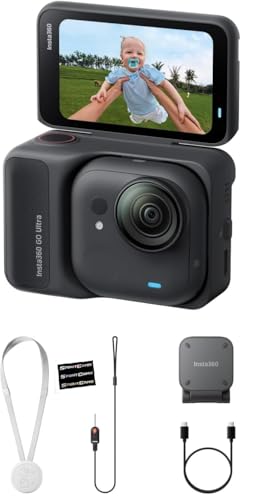
- In The Box: 1x Standalone Camera, 1x Action Pod, 1x Magnet Pendant, 1x Quick Release...
- Lightweight & Portable - 53g and the size of a watch, built for conveniently getting...
- 4K60fps Video & 4K Active HDR - Capture sports in crisp 4K at a smooth 60fps and get...

