Despite improvements to the microphone in the latest GoPro Hero 13, it still captures background noise, which can impact the overall quality of your videos.
For this reason, I highly recommend considering an external microphone for more professional audio.
In this article, I’ll walk you through the top external microphones compatible with the GoPro Hero 13 and show you how to set them up with your camera.
Start by watching my detailed review of the best GoPro microphones below:
Update (July 2026): GoPro now sells its own Wireless Mic System — the transmitters pair with the Hero 13 Black directly over Bluetooth, no Media Mod required. The complete kit runs $160, which undercuts every wireless option below. Also worth knowing: DJI has replaced the Mic 2 with the DJI Mic 3, and Rode’s current model is the Wireless GO III — both still work with the Hero 13 through the Media Mod.
Top 7 External Mics for GoPro Hero 13
Here are the seven best external microphones that I recommend for your Hero 13:
For GoPro Hero 13 users seeking top-notch wireless audio performance, the Rode Wireless GO Compact Microphone offers a flexible and lightweight option.
With a range of up to 200 meters, it operates through a 2.4GHz digital connection, providing stable audio transmission between the transmitter and receiver.
The transmitter has an integrated omnidirectional microphone but can also connect to an external lavalier mic for added convenience. Meanwhile, the receiver comes equipped with a clip, making it simple to attach to your camera or clothing.
A while back, I unboxed and tested the Hollyland Lark Max, a wireless microphone that impressed me with its studio-quality sound.
The durable metal build and well-equipped case, including two magnetic pendants, offer optimal sound capture. Its versatile design works with various clothing types, and its key feature is the ability to function independently of cameras or phones.
The Lark Max also boasts professional Electronic Noise Cancellation (ENC) for crystal-clear audio and acts as a standalone recorder with 14 hours of onboard storage.
With a range of 820ft (250m) and a 22-hour battery life, it’s a top choice for anyone looking to enhance their audio setup.
ULANZI AM18 Wireless Lavalier Microphone – Best Budget-friendly Choice
Recently, I got to try the Ulanzi M18 Wireless Lavalier Mic and was pretty impressed, especially for the price. While it’s not as tough as pricier mics like the Hollyland Lark Max or Rode, it’s a great value.
Perfect for content creators, it offers simple plug-and-play wireless use without needing extra apps or drivers.
The 100M range holds up well even in busy areas, and the LCF noise cancellation keeps your audio clear.
Battery life is solid too—14 hours on transmitters, 6 on the receiver, and an extra 20 hours with the charging case. Plus, each transmitter has 8GB of storage for up to 14 hours of backup recording.
For great audio with your GoPro Hero 13, the Rode VideoMicro is a solid pick. It’s small, lightweight, and easy to attach to your camera or use handheld.
Thanks to its super-cardioid design, it cuts out background noise and focuses on clear sound from your subject.
No need for extra batteries either—it runs off your camera’s power.
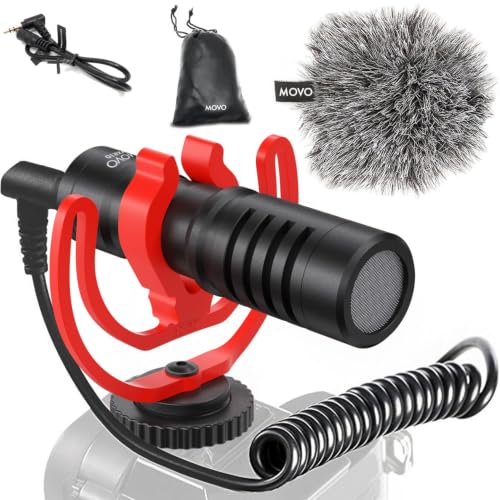
The Movo universal compact shotgun microphone offers seamless compatibility with a wide range of devices, including gopro, making it ideal for versatile content creation. Built with durable aluminum construction and a battery-free design, it features an integrated shock mount to reduce handling noise.
Perfect for recording YouTube vlogs, TikTok videos, interviews, and live events, this mic also includes a furry “Deadcat”windscreen, carrying case, and cables for both DSLR cameras and smartphones.
Rode VideoMic Pro + Compact Directional On-camera Microphone
If you’re looking for a solid shotgun mic for your GoPro Hero 13 or other cameras, the Rode VideoMic Pro+ is a reliable option. While it’s a bit bulky, it gets the job done.
With its super-cardioid polar pattern, it focuses on capturing clear audio and reducing background noise. It also comes with features like a high-pass filter, high-frequency boost, and a safety channel.
The built-in rechargeable battery lasts up to 100 hours, and it includes a shock mount and detachable cable for easy setup.
Do You Need a Mic Adapter?
The short answer is yes.
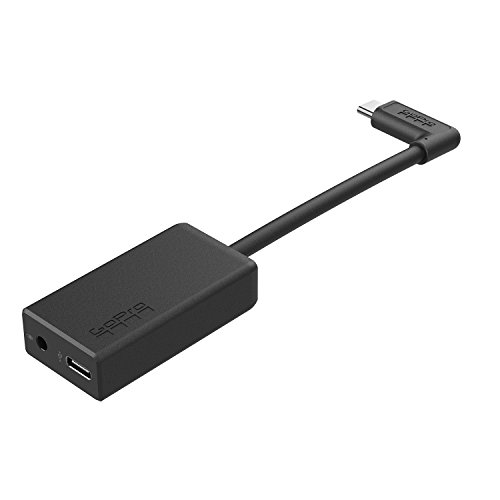
If you’re planning to use an external microphone with your GoPro Hero 13, keep in mind that you’ll need an adapter or a Media Mod for proper connectivity.
The Hero 13 comes with a USB-C port, so you’ll require an adapter with a USB-C input and a 3.5mm microphone jack output. It’s a good idea to invest in the official GoPro adapter—cheaper alternatives often fail to perform, and you’ll end up spending more in the long run.
Although GoPro says Bluetooth mics are an option, the Hero 13 uses outdated Bluetooth tech from 2011, which causes a noticeable drop in audio quality. For the best results, I recommend using a wired setup with the adapter. Otherwise, you risk losing the audio quality you expect, and the setup won’t be worth it.
Or, you can also use the GoPro Media Mod instead. It just costs slightly more, than the mic adapter. But The Media Mod also has a build in mic, which quality might already be enough for you. Plus, it gives you an opportunity to attach another accessories to your gopro.
Honestly, all the mics listed above are great for vlogging and adventures, but my go-to is definitely the Rode Wireless GO II. It’s small, super easy to use, and pairs effortlessly with the Rode mic app.
The sound quality is solid, even in busy environments – it blocks out a lot of noise but still picks up the vibe of the surroundings.
And since it’s compact and wireless, I can toss it in my bag and take it anywhere without worrying about it getting damaged.
If you’re on a budget, the Ulanzi is a decent option. It does a good job of cutting out background noise, but I’m not a fan of its cheap plastic feel.
Thanks for reading!
I hope this guide helped you know about some of the best external microphones available on the market for your GoPro Hero 13:)
Sharing is Caring ❤️
If you found this article useful, please share it on social media with your family and friends!
Can I plug an external mic straight into the GoPro Hero 13 without an adapter?
Not directly. The Hero 13 only exposes a USB-C port, so any mic with a standard 3.5mm output needs a USB-C adapter or the Media Mod in between. The one exception is GoPro’s own Wireless Mic System, whose receiver plugs straight into USB-C with no adapter needed.
Does the Hero 13 have a built-in 3.5mm mic jack?
No, GoPro dropped the analog mic jack years ago, so the Hero 13 relies entirely on USB-C for external audio. You need either the GoPro Pro 3.5mm Mic Adapter or the Media Mod to connect a standard wired or wireless receiver. I keep a spare adapter in my bag since it is easy to leave behind.
Is GoPro’s own Wireless Mic System worth buying instead of a Rode or Hollyland setup?
I have tested it and it is a legitimate option now that GoPro sells the complete kit for $160 with two transmitters, a TRS receiver, and a USB-C receiver. It pairs cleanly with the Hero 13, Hero 12, Max2, and the newer Mission 1 cameras, so it is convenient if you want one mic system across your whole GoPro kit. For the absolute best clarity I still reach for the Rode Wireless GO II, but the price gap has narrowed.
What is the best budget external mic for the Hero 13?
The ULANZI AM18 is still my budget pick since it delivers around 200 meters of wireless range and usable noise reduction for a fraction of the Rode or Hollyland price. It will not match the clarity of the pricier systems, but for casual vlogging and action clips it gets the job done.
Does using an external mic drain the Hero 13 battery faster?
Yes, running a USB-C adapter or the Media Mod pulls extra power on top of recording, so real-world runtime is shorter than GoPro’s official battery estimates. I start external-mic shoots on a fresh battery, and if I am using the Media Mod I lean on its swappable battery door so I am not stuck mid-shoot.
Can I still use Bluetooth mics and headsets with the Hero 13?
GoPro lists Bluetooth mics as supported, and its own new Wireless Mic System actually pairs over Bluetooth to the Hero 13. In my testing, though, generic Bluetooth headsets still lag behind a wired connection or a dedicated 2.4GHz system for audio clarity, so I default to wired adapters or something like the Rode Wireless GO II whenever the audio really matters.
I’m Andy Magri, an Italian filmmaker and content creator. Together with my team, I share hands-on reviews and tutorials on GoPro, DJI, Insta360, drones, and everything content creation. Our guides have helped over 2M creators worldwide — and I hope they help you find the right gear and get out there and create. Start with my free GoPro Settings Cheat Sheet.
Top GoPro Hero 13 Waterproof Cases for Snorkeling and Diving
New Epic GoPro Hero 13 Accessories For Action & Travel
ProjectGO is reader-supported. As an Amazon Associate, we earn from qualifying purchases made through links on this site — at no extra cost to you.